The night-street transition
Make the Devil Wears Prada transition from one photo.
Turn your portrait into an indoor-to-night-street outfit reveal. Upload one clear photo—no filming or prompt writing needed.
Choose photo → Sign in → Pay → Generate & download
- 1. Photo
- 2. Create
- 3. Video
Make your trend video
$9.99 One video · 720p model setting · one-time payment
One-time payment. Sign in to continue; generation starts after payment.
Payment & currency details
Base price: $9.99 USD. Stripe may offer payment in a local currency; review the final amount and currency at checkout. The ruble estimate shown on this site is for reference only. Your bank may apply conversion fees.
Start with a photo. Then sign in to keep your video and continue to checkout.
What is Devil Wears Prada AI?
Devil Wears Prada AI is a photo-to-video tool that turns one adult portrait into an indoor-to-night-street outfit transition. One video costs $9.99 USD and is delivered as an approximately 15-second, 4:3 MP4 using the 720p model setting, with model-generated audio. No filming or prompt writing is required.
- Input
- One portrait of one consenting adult
- Output
- Approx. 15-second MP4 · 4:3
- Model setting
- 720p
- Audio
- Model-generated sound; original trend song not added
- Access
- Sign in or register before payment
- Payment
- $9.99 USD per video · one-time payment
- Processing
- Varies with provider queue and generation
What is the Prada Prada Prada transition?
Also called the Devil Wears Prada trend, this outfit transition moves from an at-home performance to a night-street reveal. In our version, black frame edges close around the person before the scene changes. This is a photo-to-video tool, independent of Prada and the film studios.
See one photo become a complete transition
This example was generated with Devil Wears Prada AI on 22 October 2026, using an AI-created portrait of a fictional adult. Watch the full video with sound, then follow the three moments below.
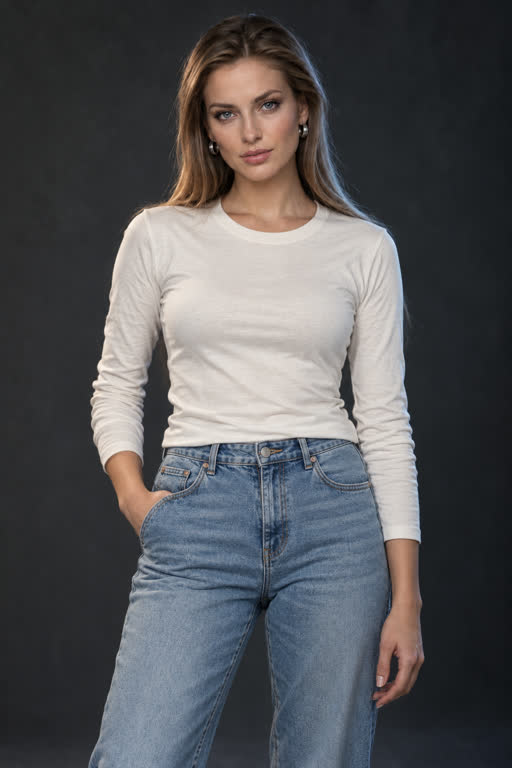
The input portrait
One clear face, visible upper body and a simple everyday outfit. This is the exact portrait used for this example; no second outfit photo was uploaded.
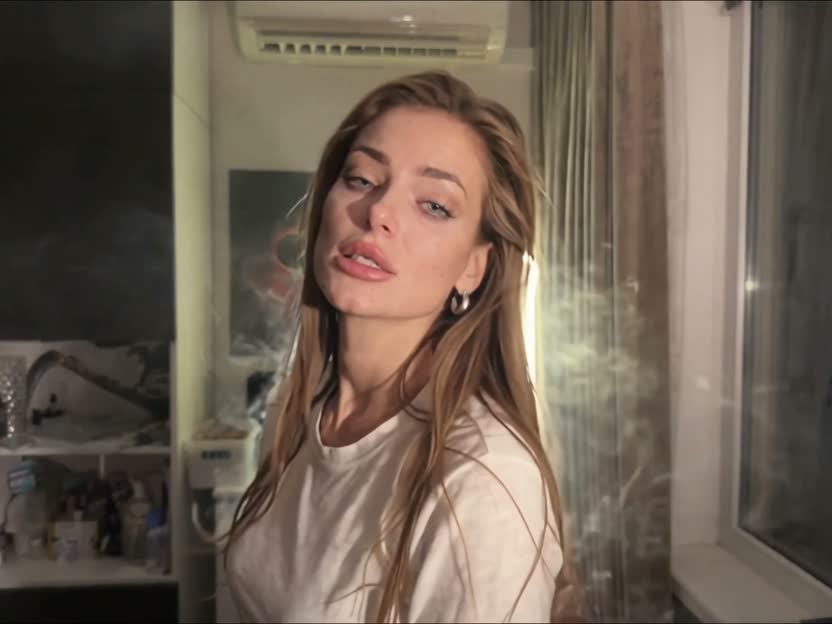
01 · Indoor opening · frame at 1s
The video begins with the portrait’s light top and everyday look in an indoor scene.
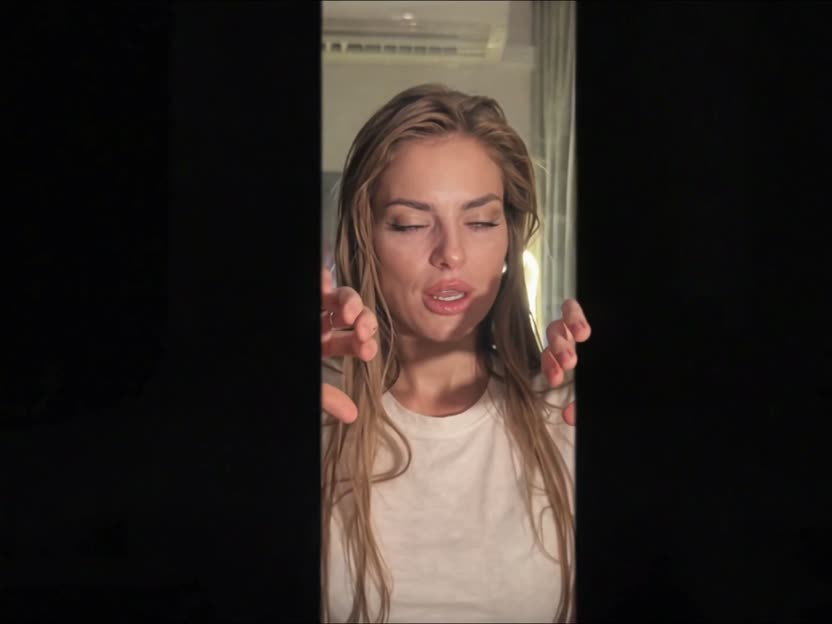
02 · Black-edge transition · frame at 7s
Dark edges close around the person, creating the transition between the two scenes.
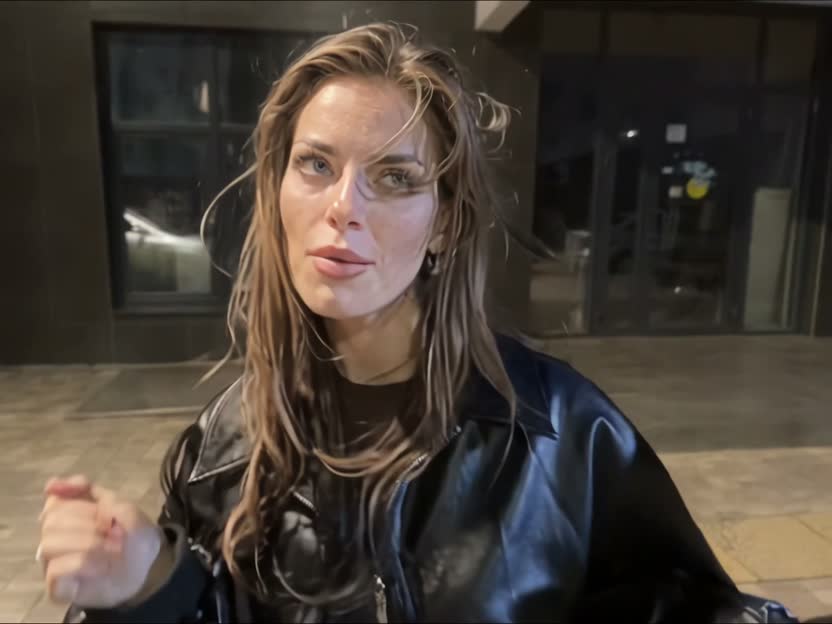
03 · Night-street reveal · frame at 12s
The scene opens onto a lit street, with a black jacket completing this example’s outfit change.
Frames are taken at 1, 7 and 12 seconds in this example. Appearance, movement, audio and timing vary between generations.
Make a video from my photoFrom your photo to your video
- 01
Choose one clear photo and preview it here.
- 02
Sign in or create an account using an available sign-in option. Your photo is restored after sign-in.
- 03
Pay once, follow generation progress and download your video.
Choose a photo the model can read clearly
Use JPG, PNG or WebP up to 10 MB, with one consenting adult, good lighting and an unobstructed face. A clear portrait with the upper body visible gives the model a useful reference. Avoid group photos and heavy blur.
One video. One payment.
$9.99 USD covers one approximately 15-second video at the 720p model setting, in 4:3 MP4 with model-generated audio. Sign in before checkout. There is no subscription or required credit pack.
See the $9.99 price and what is includedQuestions before you generate
Can I make the Devil Wears Prada trend from one photo?
Yes. Devil Wears Prada AI turns one clear portrait into an approximately 15-second, single-person outfit-transition video. Use a photo of yourself or a consenting adult; a second photo is not required.
Do I need to film myself, use CapCut or write a prompt?
No filming or prompt writing is required for the default AI workflow. Select your photo, sign in and pay once. An editor such as CapCut is useful if you want to assemble your own filmed footage or crop the result.
Does it include the original trend song?
The video includes audio returned by the model. The service does not separately add the original trend song, so the soundtrack may differ from videos you have seen on social media.
Is the output vertical for TikTok or Reels?
The current output is 4:3. You can crop it to 9:16 in a video editor; preview the crop to keep the face and transition edges visible.
Is it free, and what does one complete video cost?
One complete video costs $9.99 USD as a one-time payment through Stripe. Sign-in is required. There is no subscription; packs and paid upgrades are not currently offered.
Will the generated person still look like me?
Your photo guides the person’s appearance, but AI can change facial details and movement. Watch the complete example to see how the face appears across the transition, and review your own result before sharing.
What kind of photo should I upload?
Choose a JPG, PNG or WebP file up to 10 MB. Use one well-lit adult face, ideally with the upper body visible. Avoid group photos, heavy blur and objects covering the face. Upload only photos you have permission to use.
What happens if generation fails?
If the provider confirms failure after payment, the service requests a refund. Pending or uncertain jobs and delivery problems need a status check first. Do not pay again while a job is being reviewed. See our refund policy for technical defects and processing times.